
Getting started with your Instant Pot Pro 5.7L Multi-Cooker - Step-by-Step
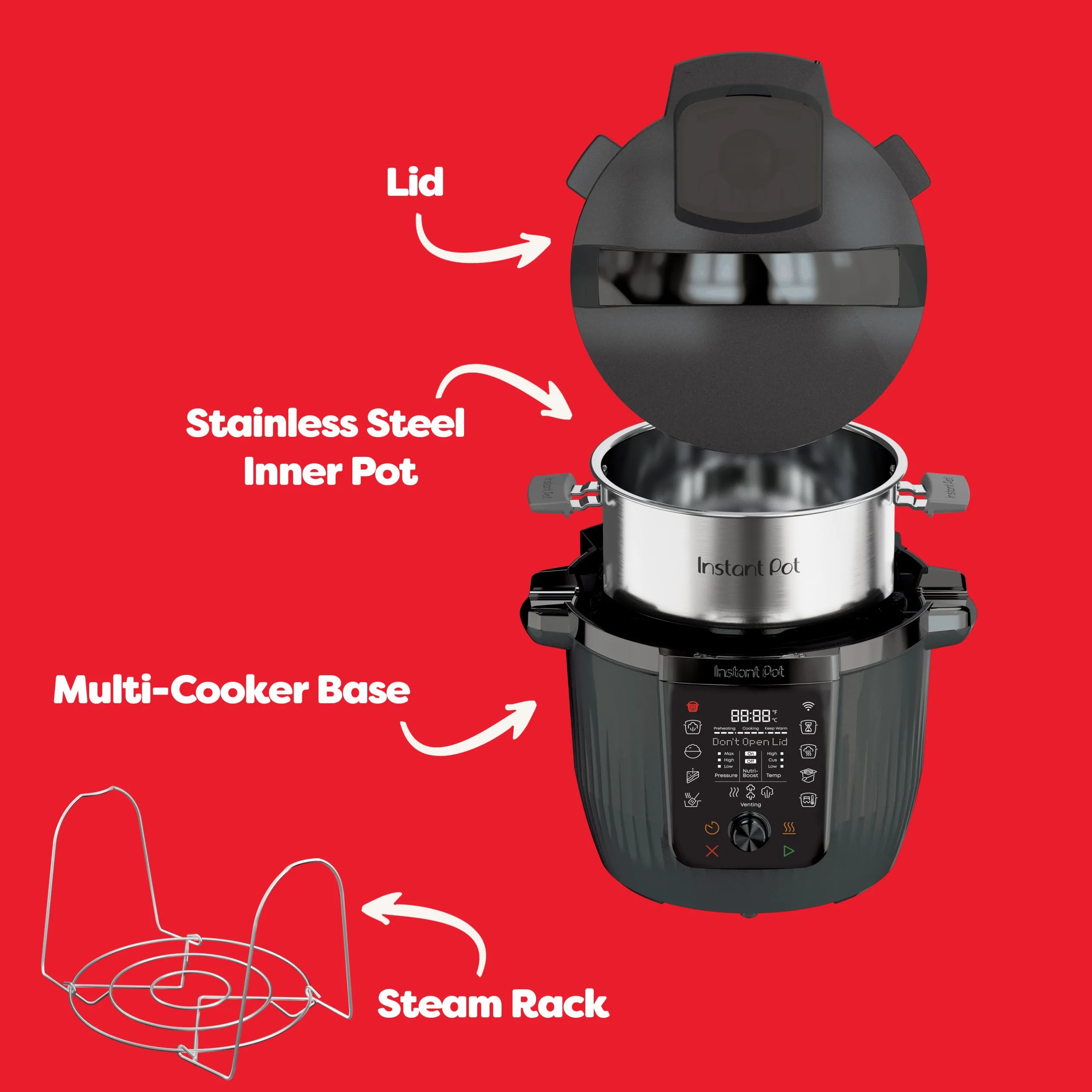
1.1 Product explained
1.2 Learn about pressure release
Select pressure release method on the control panel or via the app and wait until the float valve drops into the lid.
Watch the video to learn how to learn about pressure release.
2.1 Clean before use
Wash the inner pot with hot water and soap, dry thoroughly. Wipe the heating element inside the cooker base and the inside of the lid to remove any stray packaging particles.
2.2 Locate the condensation collector
The condensation collector sits at the back of the cooker base and accumulates overflow moisture. It should be installed before cooking, then emptied and rinsed out after each use.
To remove, pull the condensation collector horizontally away from the cooker base; do not pull down.
To install, align the grooves on the condensation collector with the tabs on the back of the cooker base and slide the condensation collector into place.
2.3 Perform a test run
Before using your new Instant Pot Pro 5.7L Multi-Cooker for the first time, you must perform a pressure cooking test run to ensure everything is working correctly.
2.4 Pair with the app
Watch the video to learn how to pair your Instant Pot Pro 5.7L Multi-Cooker with the Instant Connect app.
2.5 Cooking with the app
Watch the video to learn how to cook with the Instant Connect app.
3.1 Setting a cooking mode on the control panel
Watch the video to learn how to set a cooking mode on the control panel of your Instant Pot.
3.2 Pressure Cooking
Tips for best results
-
Always deglaze before Pressure cooking.
- Always add liquid when Pressure cooking.
- Liquids should be water-based, such as broth, stock, soup or juice. If using canned, condensed, or cream-based soup, add water to ensure you meet the minimum 375ml of liquid required.
- Do not overfill the inner pot, and ensure all contents are below the PC Max – 2/3 line shown.
Before using your new Instant Pot for the first time, you must perform a pressure-cooking test run to ensure everything is working correctly.
3.3 Slow Cook
There are two available settings on the Slow Cook function. These determine how long the Instant Pot takes to reach simmer point. For example, the low setting takes 4+ hours to gradually bring the food to simmer, which is better for tenderising tougher cuts of meat. The high setting takes 2+ hours to gradually bring the food to simmer, which is better if you have limited time.
3.5 Sous Vide
Watch the video to learn how to Sous Vide in your Instant Pot.
3.4 Sauté
Tips for best results: Do not put the lid on when using the Sauté function. Always deglaze the inner pot after sautéing.3.6 Delay Start
Delay Start can be set from between 10 minutes (00:10) and 24 hours (24:00).
(Not available with the Sauté or Yoghurt Smart Programmes)
3.7 Keep Warm
When cooking is complete, the display shows End if Keep Warm is turned off. If not, the timer begins counting from 00:00 up to 10 hours (10:00).
4.1 Full recipe collection
Tried and tested recipes for you to try at home
4.2 Cooking timetable
Access our Cooking Timetable.
4.3 Downloadable recipe eBooks
Join the Instant Pot UK Facebook Community to access our growing collection of downloadable Recipe eBooks.
The eBooks can be found in the files section of the community
Extra product information
Cleaning
Clean your Instant Pot after each use. Always unplug the unit and let all parts cool to room temperature before cleaning. Before use or storing, make sure all surfaces are dry.
All parts of your Instant Pot aside from the multi-cooker base and power lead are dishwasher-safe.
For the steam rack, lid and lid parts, place on the top rack of the dishwasher only. Remove all parts of the lid (steam release valve, valve cover, float valve, sealing ring and anti-block shield) before cleaning.
Watch the video to learn how to clean the lid.